|
Ok, so you have eight effects pedals which you use regularly. You use
various combinations of these pedals in various songs, but you are not
good at tap dancing…or you are just clumsy and have (once or twice)
stepped on the ultra tricked out-metalized-distortion pedal for the lead
in your one ABBA cover. You have seen the digital effects controllers
they use on the big stages, and have secretly yearned for one… even
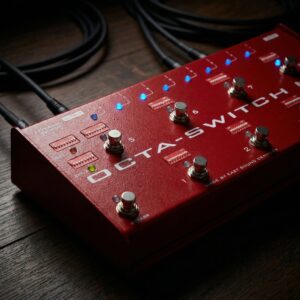
though you may never make the big stage. Enter Thomas Guldmann’s Octa-switch
II. Your eight effects plug into the eight effects-loops on the back of
this unit (all true-bypass, impedance free, gold relays so you can run
any of your pedals, new and old without problem), and then by turning on
or off the numbered switches in each of eight DIP Bank switches, you
determine which effects you wish to use simultaneously in each Bank.
There is a blue LED for every effects loop used and for each Bank (so
once you are programmed, when you step on Bank 6 you will see the lights
of all the effects you have assigned to Bank 6 and the Bank 6 LED). The
Octa-switch II has incorporated a couple new features as well!
The ninth switch on the left side of the case is a BYPASS
Switch….this allows you to completely bypass all eight pedals and
enjoy only the unaffected sound
of your amplifier. There
are also two External Switching jacks which allow you to use two
amplifiers and/or switch channels on those amps. Once you have all the
Banks programmed, we recommend placing a piece of scotch or electrical
tape over each DIP (….just to protect the switch from accidental
switching, damage or
floods….like beer). There is a buffered (or not….switchable) Mono
input and a stereo Output, and the unit is powered by dual 9v batteries,
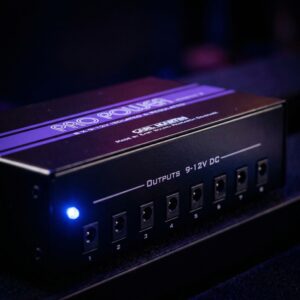
or by a regulated power supply…like the Big John or the Pro Power
(both by Carl Martin).
To
set up the Octa-swtch, plug up to eight pedals and amp(s) into the
appropriate inputs/outputs on the back of the pedal.
The pedals can be in any particular order you prefer or you can
follow the general rule from 1-8 of compression, overdrive, and
modulation. Then by turning on or off the numbered switches in each of
eight DIP Bank switches, you determine which effects you wish to use
simultaneously in each Bank. There is a blue LED for every effects loop
used and for each Bank (so once you are programmed, when you step on
Bank 6 you will see the lights of all the effects you have assigned to
Bank 6 and the Bank 6 LED). In order for the pedals to work properly with the Octa-switch,
all the pedals must be turned on. (A
quick performance note is required here….when you are using the Octa-switch,
and there are pedals you only use rarely, it is a good idea to turn them
off and then on again to disperse any built up charge that could cause a
‘pop’ when you engage them with the Bank switch….a good time to do
this is at the end of each set you play!)
Please
note, the DIP switches are slide type, NOT push down. They are
easily operated with a small screwdriver, a pen, or a very very small
finger.
There is a buffered or True Bypass
(non-buffered) switch at the back of the Octa-switch which you select
depending on the stage set-up or your personal preference.
On large stages when running long connected cables, there is a
definite drop in the high end of your guitar sound (more or less
depending on the input impedance of your amplifier). The solution
according to Thomas was once again ‘simple’. He built in a buffer
circuit at the input, so the user can choose between 100% true bypass,
or, a buffered bypass to ‘beef’ up the signal.
The
Octaswitch has stereo outputs as well as the stereo return on Loop 8
(this is
a
stereo jack with tip-left and ring-right). Since stereo effects like
choruses
are
placed at the end of your effects-chain, we would typically insert them
in
Loop 8.
The
Octa-Switch has nine switches, the eight are presets and the ninth is an
effect Bypass, which will bypass the Octa-switch to your un-affected
amplifier sound. Please note if the Buffered Input is engaged at the
back of the pedal, it will
also be engaged in the bypass Mode on top of the pedal, as they work in
conjunction with each other. Similarly,
if the True Bypass Input is engaged at the back, the Bypass switch on
top will switch to a True Bypass signal.
The
Octa-Switch has two external switching jacks for changing
channels
on your amp(s), or other operational features.
Setting
up the External Switches, is as easy as setting up the Banks. The two
external outputs correspond to the two DIP switches above them and their
Green/Red LED’s. The
simplest set-up is with one amp…. plug the amp’s channel switch into
the External Switch Jack 1, and select which of the eight banks require
a switched channel (ie high gain) by setting the individual DIP Switches
to ‘ON’. Now; when you
engage Bank 6 for instance, it will automatically switch to high gain
rather than having to step on another separate switch.
Please
note that different amplifiers and different amplifier companies use
different switching systems. If
plugging straight into the Octa-switch does not give you the desired
result, we suggest you contact your local qualified amp technician
and have him make the required change to your amp’s switch, so
it will function with the Octa-switch.
(It is impossible to have a switching system that will work with
every amp on the market, but because all switching systems are similar,
it should be possible to have them all work with the Octa-switch with!
For safety reasons, we do not recommend you open or attempt to service
this pedal, your switches or your amplifiers unless you have the proper
qualifications!)
|